


Digital signage touch screen technology has revolutionised how businesses communicate with customers, transforming static displays into powerful interactive platforms. As we move through 2026, these dynamic systems have become essential tools across retail, hospitality, healthcare, and corporate environments. The convergence of high-resolution displays, responsive touch sensors, and sophisticated content management software creates opportunities for unprecedented customer engagement and operational efficiency.
Understanding Digital Signage Touch Screen Technology
A digital signage touch screen combines visual display capabilities with tactile input sensors, enabling users to interact directly with on-screen content. Unlike traditional digital signage that broadcasts information passively, touch-enabled systems invite participation, gather data, and deliver personalised experiences.
Modern touch technology has evolved considerably. Capacitive touchscreens, which detect electrical conductivity from fingertips, now dominate the market due to their precision and multi-touch capabilities. Infrared touch frames offer durability and work with gloves or styluses, making them ideal for industrial or outdoor applications. Optical touch sensors provide exceptional clarity and support screens of virtually any size.
Core Components of Interactive Display Systems
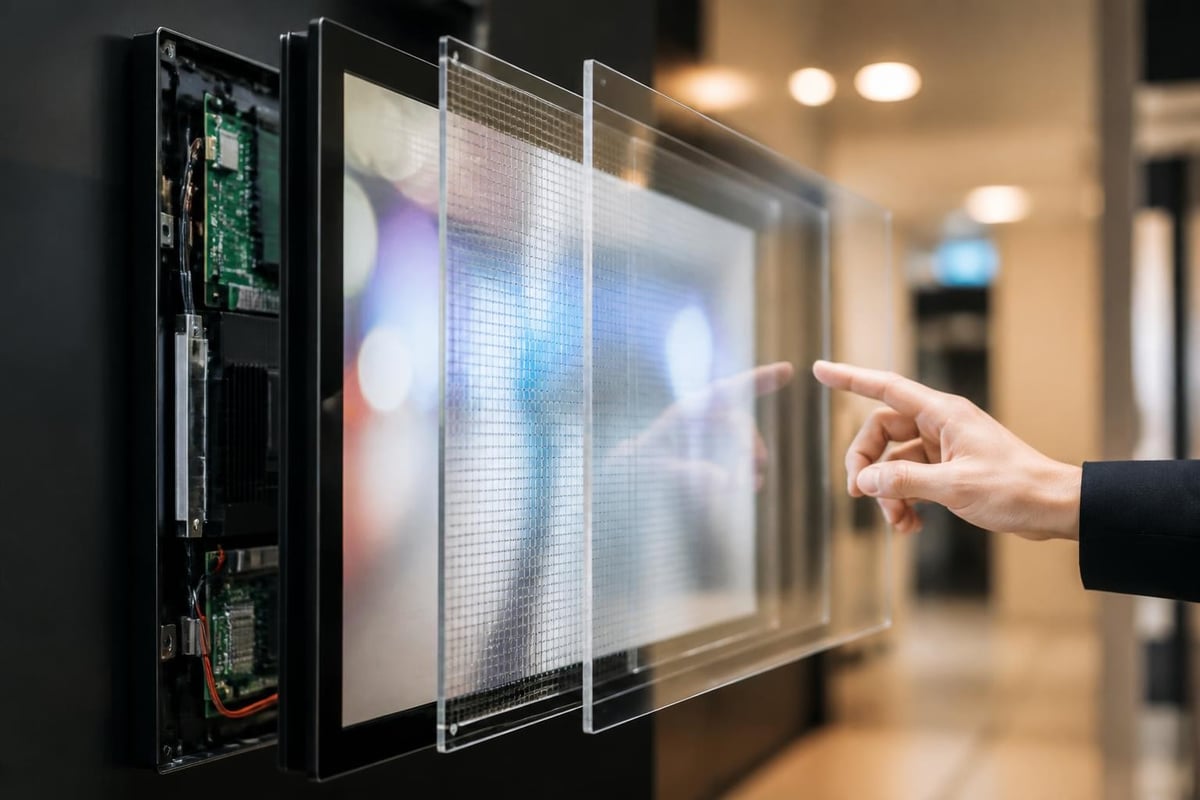
Every digital signage touch screen system comprises several integrated elements:
- Display panel: LCD, LED, or OLED screens ranging from 10 inches to wall-sized installations
- Touch sensor layer: Capacitive, infrared, optical, or resistive technology
- Media player: Processing unit running content management software
- Mounting hardware: Wall mounts, floor stands, or kiosk enclosures
- Network connectivity: Wi-Fi, Ethernet, or cellular for remote management
- Power supply: Standard or power-over-Ethernet solutions
The display panel quality directly impacts user experience. Commercial-grade screens offer higher brightness (450-700 nits) than consumer displays, ensuring visibility in brightly lit environments. Anti-glare coatings reduce reflections, whilst tempered glass overlays protect against vandalism and everyday wear.
Strategic Applications Across Industries
Retail environments have embraced digital signage touch screen technology to enhance the shopping experience. Interactive product catalogues allow customers to browse extended inventory beyond what physical space permits. Wayfinding kiosks guide shoppers through large stores or shopping centres, whilst self-service checkouts reduce queue times and staffing requirements.
Healthcare facilities deploy touch screens for patient check-in, reducing administrative burden and improving privacy. Visitors access directories, appointment information, and educational content through intuitive interfaces. According to W3C guidance on input modalities, healthcare applications must prioritise accessibility to serve patients with varying abilities.
| Industry Sector | Primary Application | Key Benefit |
|---|---|---|
| Retail | Product exploration | Increased engagement |
| Hospitality | Self-service check-in | Reduced wait times |
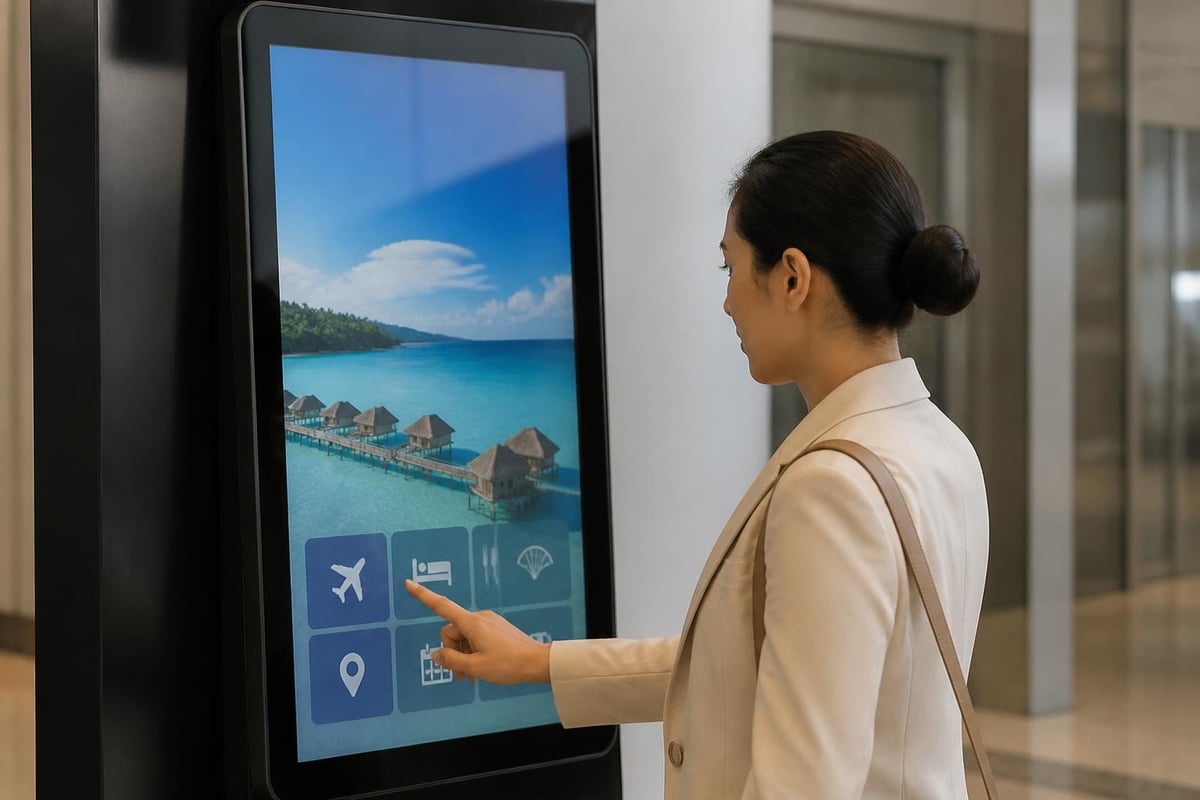
| Corporate | Meeting room booking | Space optimisation |
| Education | Campus wayfinding | Improved navigation |
| Transport | Ticketing and information | Operational efficiency |
Quick-service restaurants have transformed ordering processes through digital signage touch screen kiosks. These systems display menu items with vivid imagery, suggest add-ons, accommodate customisation, and process payments-all without staff intervention. The result is higher average transaction values and improved order accuracy.
Enhancing Customer Engagement Through Interactivity
Passive viewing becomes active participation when customers can touch, swipe, and explore content. Digital signage touch screen installations capture attention more effectively than static displays, with interaction rates often exceeding 35% in high-traffic locations.
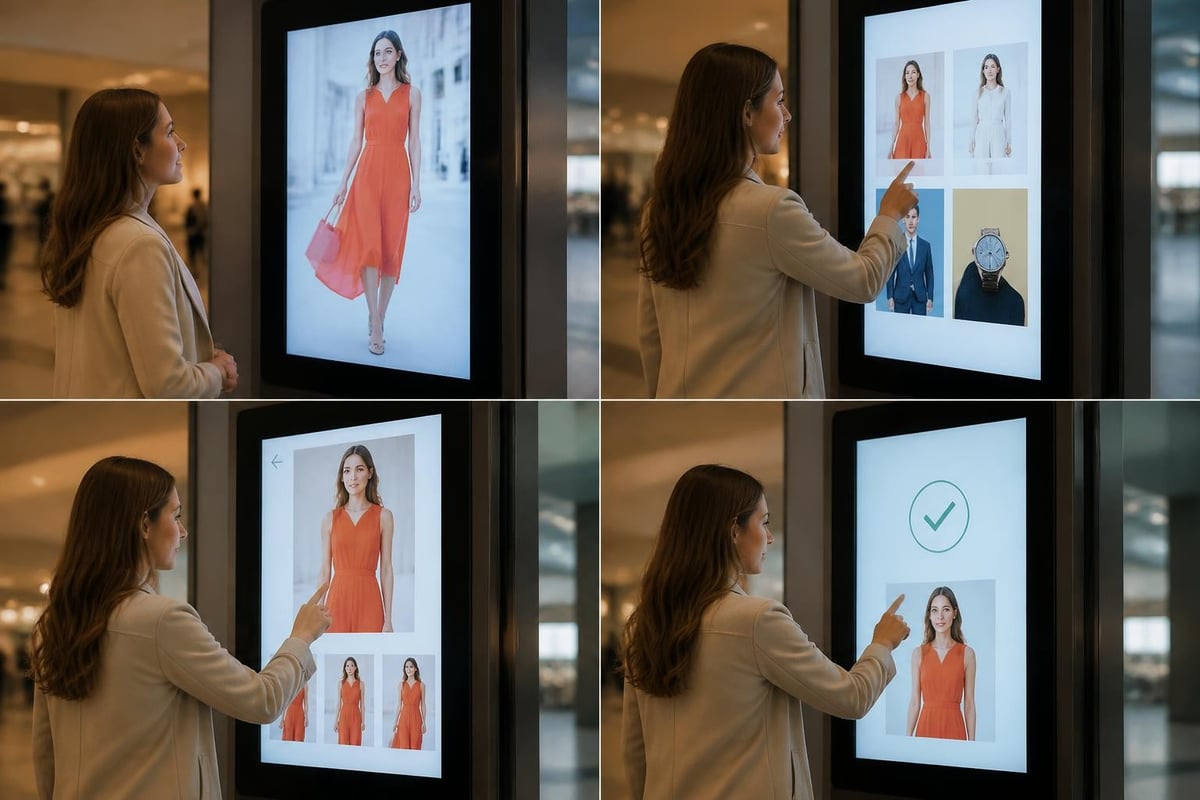
The psychological principle of agency plays a crucial role. When users control their information journey, they invest more time and attention. A clothing retailer's virtual fitting room allows customers to see garment combinations without physical changes. A property developer's interactive floor plan lets prospective buyers explore layouts, finishes, and views at their own pace.
Design Considerations for Optimal User Experience
Interface design for digital signage touch screen systems differs fundamentally from desktop or mobile applications. Screen size, viewing distance, and environmental factors shape every design decision. Nielsen Norman Group research on very large touchscreen UX design highlights critical considerations for large-format interactive displays.
Essential Design Principles
Button size and spacing must accommodate fingers rather than mouse pointers. Minimum touch targets of 44×44 pixels (roughly 9mm square) prevent accidental selections. Adequate spacing between interactive elements reduces frustration and errors.
Visual hierarchy guides users through complex information. High-contrast colours, generous white space, and clear typography ensure readability from various distances. Text size should start at 24 points for body copy, scaling up to 72 points or larger for headings on large displays.
Response feedback confirms every interaction. Visual changes, subtle animations, or audio cues assure users that the system registered their touch. Delays longer than 100 milliseconds feel sluggish and erode confidence.
Following W3C pointer-gestures standards ensures your interface remains accessible. Complex multi-touch gestures should always have single-pointer alternatives. A pinch-to-zoom feature might also include dedicated plus and minus buttons.
The concept of progressive disclosure prevents overwhelming users with excessive options. Initial screens present broad categories, with subsequent touches revealing deeper detail. A museum exhibit kiosk might start with gallery sections, then specific artists, finally individual artwork information and multimedia content.
Technical Implementation and Integration
Deploying digital signage touch screen systems requires careful planning across hardware selection, software configuration, and network infrastructure. The technology stack must align with both current requirements and future scalability needs.
Hardware Selection Criteria
Screen durability varies significantly across products. Commercial displays rated for 16-24 hour daily operation include better cooling systems and longer-lasting components than consumer models. For public-facing installations, IP-rated enclosures protect against dust and moisture, whilst vandal-resistant construction withstands deliberate abuse.
Processing power determines content complexity and responsiveness. Simple menu systems run adequately on entry-level media players, but video-heavy content, 3D visualisation, or real-time data integration demands dedicated graphics processing. Cloud-based content management offloads some processing but requires reliable connectivity.
- Assess environmental conditions: indoor vs outdoor, temperature range, ambient light
- Determine mounting requirements: wall, floor stand, countertop, or ceiling suspension
- Calculate power and connectivity: electrical access, network cabling, backup power needs
- Plan maintenance access: service panels, remote diagnostics, component replacement
- Consider security measures: physical locks, content encryption, user authentication
Content management software orchestrates what appears on screens and when. Enterprise-grade platforms support scheduling, multi-location deployment, user analytics, and integration with existing business systems. For instance, a digital signage touch screen in a corporate lobby might pull meeting schedules from Microsoft 365, display building announcements, and provide visitor registration simultaneously.
The AVIXA perspective on digital-signage players explores trade-offs between embedded systems-on-chip, external media players, and cloud-based solutions. Each approach offers distinct advantages in cost, flexibility, and management overhead.
Accessibility and Compliance Requirements
Public-facing digital signage touch screen installations must accommodate users with diverse abilities. Legal frameworks and ethical imperatives both demand inclusive design. The U.S. Department of Justice guidance on kiosks and Information Transaction Machines outlines requirements for accessible public touchscreens.
Physical accessibility begins with proper mounting height. Touch zones should fall between 380mm and 1220mm above the floor, reachable from both standing and seated positions. Clear floor space of at least 760mm depth allows wheelchair approach.
Visual accessibility incorporates high-contrast colour schemes, adjustable text size, and screen reader compatibility. Audio output options enable blind or low-vision users to navigate independently. Recent research published in Toucha11y explores making public touchscreens accessible to blind users, demonstrating effective multi-modal interaction techniques.
Cognitive accessibility simplifies language, provides clear instructions, and allows sufficient time for task completion. Avoid automatic timeouts shorter than 120 seconds, and always provide a "need more time" option.
| Accessibility Feature | Implementation Method | User Benefit |
|---|---|---|
| Audio feedback | Text-to-speech output | Vision-impaired users |
| High contrast mode | Colour scheme toggle | Low-vision users |
| Large text option | Dynamic font scaling | Users with presbyopia |
| Simple language | Plain English, icons | Cognitive disabilities |
| Extended timeouts | Configurable sessions | Motor impairments |
Compliance extends beyond physical accessibility. Federal guidance on web and ICT accessibility applies to digital interfaces including touchscreen signage. WCAG 2.2 Level AA conformance has become the de facto standard for public-facing interactive systems.
Security and Privacy Considerations
Interactive digital signage collects user data through touch patterns, selections, and sometimes personal information input. This creates both opportunities and responsibilities. Robust security practices protect both the business and its customers.
Data collection policies must be transparent. If your digital signage touch screen gathers analytics, inform users through clear privacy notices. Anonymous usage data (which categories users explore, how long they engage) raises fewer concerns than personally identifiable information.
Protecting Public-Facing Systems
Public touchscreens face unique security challenges. Anyone can physically access the device, and malicious actors may attempt to:
- Install malware through USB ports or network connections
- Access backend systems through poorly secured interfaces
- Retrieve sensitive information left by previous users
- Damage hardware through physical attack
The NIST IoT Device Cybersecurity Requirement Catalogs provide comprehensive guidance for securing publicly accessible devices. Critical measures include disabled external ports, encrypted network communications, automatic session clearing, and regular security updates.
Kiosk mode software locks down the operating system, preventing users from accessing anything beyond the intended interface. This containment protects both the system and other users' data. Sessions should automatically reset after 30-60 seconds of inactivity, clearing any personal information and returning to the home screen.
Content Strategy for Interactive Displays
The most sophisticated digital signage touch screen hardware fails without compelling content. Effective interactive content balances information density with usability, providing value without overwhelming users.
Content Architecture Fundamentals
Structure information hierarchically, with no more than five to seven options per screen. Research in cognitive psychology demonstrates that human working memory handles limited chunks of information simultaneously. A retail directory might organise by department, then category, then specific products-three clear levels.
Visual content dominates text. High-quality images, short videos, and infographics communicate faster than paragraphs. When text is necessary, keep it concise. Screen content should be scannable in under three seconds at each level.
Update frequency maintains relevance. Stale content suggests neglect and erodes trust. Establish refresh schedules appropriate to your content type:
- Static information (company history, building maps): quarterly review
- Promotional content (sales, events): weekly or campaign-based updates
- Dynamic data (queue times, availability): real-time integration
- News and social feeds: continuous automated updates
Call-to-action elements must be explicit and immediate. Rather than generic "Learn More" buttons, specify the outcome: "View Product Details," "Book Appointment," "Print Map." Users should understand exactly what happens when they touch.
Signshoponline's expertise in Digital Signage solutions extends to developing content strategies tailored for touch-enabled displays, ensuring your interactive installations deliver measurable engagement and return on investment across retail, corporate, and public environments.
Measuring Success and Return on Investment
Digital signage touch screen systems generate valuable data that demonstrates value and guides optimisation. Unlike passive displays, interactive installations reveal precisely how users engage with content.
Analytics platforms track multiple metrics:
- Interaction rate: percentage of viewers who touch the screen
- Session duration: average time users spend engaging
- Path analysis: which content sequences users follow
- Conversion actions: form submissions, QR code scans, purchases initiated
- Peak usage times: when engagement is highest
A shopping centre's wayfinding kiosk might record 2,400 sessions daily, with 67% of users finding their destination within 30 seconds. This data justifies the installation cost whilst identifying improvement opportunities-perhaps certain stores are difficult to locate and need clearer signage.
Optimisation Through Data
Compare performance across locations, content variations, and time periods. A/B testing applies to digital signage touch screen content just as it does to websites. Display two different home screen layouts alternately and measure which generates higher engagement.
Heatmaps visualise where users touch most frequently, revealing which content attracts attention. Dead zones-seldom-touched areas-suggest poor layout or uninteresting content requiring revision.
Return on investment calculations vary by application. Retail kiosks might measure sales influenced, comparing purchase data from customers who used the system versus those who didn't. Self-service check-in kiosks calculate staff hours saved multiplied by wage costs.
| Performance Indicator | Measurement Method | Optimisation Action |
|---|---|---|
| Low interaction rate | Proximity sensors + touches | Improve attract screen |
| High abandonment | Session incomplete rate | Simplify navigation |
| Uneven usage | Hourly engagement data | Adjust content scheduling |
| Navigation confusion | Path analysis loops | Restructure menu hierarchy |
Organisations typically see digital signage touch screen installations pay for themselves within 12-24 months through some combination of increased revenue, reduced staffing costs, and improved customer satisfaction scores.
Future Developments in Touch Technology
The digital signage touch screen landscape continues evolving rapidly. Emerging technologies promise even more immersive and intuitive experiences over the coming years.
Gesture recognition systems eliminate physical touch entirely, using depth cameras to detect hand movements in three-dimensional space. This approach reduces disease transmission concerns whilst enabling interactions from greater distances-valuable for large-format displays or crowded spaces.
Voice interaction complements touch for certain tasks. Speaking a search query often proves faster than typing on a virtual keyboard. Multimodal interfaces combining touch, voice, and gesture provide flexibility for different user preferences and abilities.
Artificial intelligence enables personalisation at scale. Cameras assess viewer demographics (age range, gender, attention level) and adapt content accordingly, whilst respecting privacy through edge processing that never stores images. A fashion retailer's digital signage touch screen might emphasise different product categories based on who's standing in front of it.
Augmented reality integration overlays digital content onto physical products. Point a digital signage touch screen at a store shelf, and it displays detailed specifications, reviews, or demonstration videos for the selected item. This blended reality creates seamless connections between digital information and physical products.
Haptic feedback technology provides tactile responses beyond simple vibration. Advanced haptic displays create the sensation of buttons, textures, or resistance, making touchscreen interaction feel more like manipulating physical objects. This reduces errors and enhances satisfaction, particularly for complex applications like 3D modelling or virtual assembly instructions.
Installation Best Practices
Successful digital signage touch screen deployment extends beyond selecting quality hardware. Proper installation ensures longevity, optimal performance, and positive user experiences.
Site Selection and Preparation
Location dramatically impacts usage rates. High-traffic areas with natural dwell time-building entrances, queue areas, waiting rooms-generate maximum engagement. Avoid locations with direct sunlight, which causes glare and accelerates display degradation.
Power and network infrastructure must be in place before installation day. Running cables through finished walls or ceilings often represents the most expensive and time-consuming aspect of deployment. Plan cable paths carefully, considering future maintenance access.
Environmental control matters for equipment lifespan. Digital signage touch screen components generate heat and perform optimally between 0°C and 40°C. Enclosed installations require ventilation or active cooling. Outdoor installations demand weatherproof enclosures with heating elements for cold climates.
Mounting height and angle require precision. A poorly positioned screen causes neck strain or requires awkward reaching. Vertical screens suit portrait content and compact spaces, whilst horizontal orientations feel more natural for landscape photography or videos. Tilted installations reduce glare but may feel less stable or accessible.
- Conduct site survey: measure dimensions, identify obstructions, assess lighting conditions
- Prepare infrastructure: electrical circuits, network drops, mounting anchors
- Assemble equipment: displays, media players, enclosures before on-site installation
- Mount and connect: secure displays, run cables, establish network connectivity
- Configure and test: load content, calibrate touch sensors, verify all functions
- Train stakeholders: content managers, maintenance staff, front-line employees
- Monitor initial period: address issues quickly, gather user feedback
Professional installation services ensure compliance with building codes, electrical standards, and safety requirements. Commercial displays weigh considerably more than consumer models-a 55-inch commercial touch screen can exceed 35 kilograms, requiring robust mounting and multiple installers.
Maintenance and Ongoing Support
Digital signage touch screen systems require regular maintenance to sustain performance and appearance. Neglected installations quickly degrade, undermining the professional image they're meant to project.
Daily cleaning removes fingerprints, smudges, and debris. Use microfibre cloths slightly dampened with water or approved screen cleaner. Avoid harsh chemicals, abrasive materials, or excessive moisture. Public-facing screens in high-traffic areas may require multiple cleanings daily.
Touch sensor calibration drifts over time, causing responsiveness issues. Most systems include calibration utilities accessible through service menus. Quarterly recalibration maintains accuracy, though heavily used installations may require monthly attention.
Software updates address security vulnerabilities, fix bugs, and add features. Establish update schedules during low-traffic periods to minimise disruption. Test updates on a representative system before deploying fleet-wide to catch compatibility issues.
Component lifecycle planning prevents unexpected failures. Commercial displays typically offer 50,000-100,000 hour ratings (approximately 6-11 years of 24/7 operation). Budgeting for replacement before catastrophic failure allows orderly transitions rather than emergency purchases.
Remote monitoring tools alert administrators to problems before users notice. Temperature sensors, connectivity checks, and content verification ensure systems operate correctly. When issues arise, many can be resolved remotely without dispatching technicians.
Support contracts from equipment suppliers or integrators provide peace of mind. Coverage typically includes phone support, remote diagnostics, on-site service, and replacement parts. Evaluate support terms carefully-response time commitments and parts availability directly impact downtime costs.
Digital signage touch screen technology offers transformative opportunities for businesses seeking to enhance customer engagement, streamline operations, and create memorable interactive experiences. By carefully considering hardware capabilities, content strategy, accessibility requirements, and ongoing maintenance, organisations can deploy systems that deliver lasting value. Whether you're exploring interactive wayfinding, self-service solutions, or immersive product showcases, Signshoponline provides the expertise and comprehensive signage solutions to bring your vision to life with professional-grade digital signage systems tailored to your specific requirements.


