

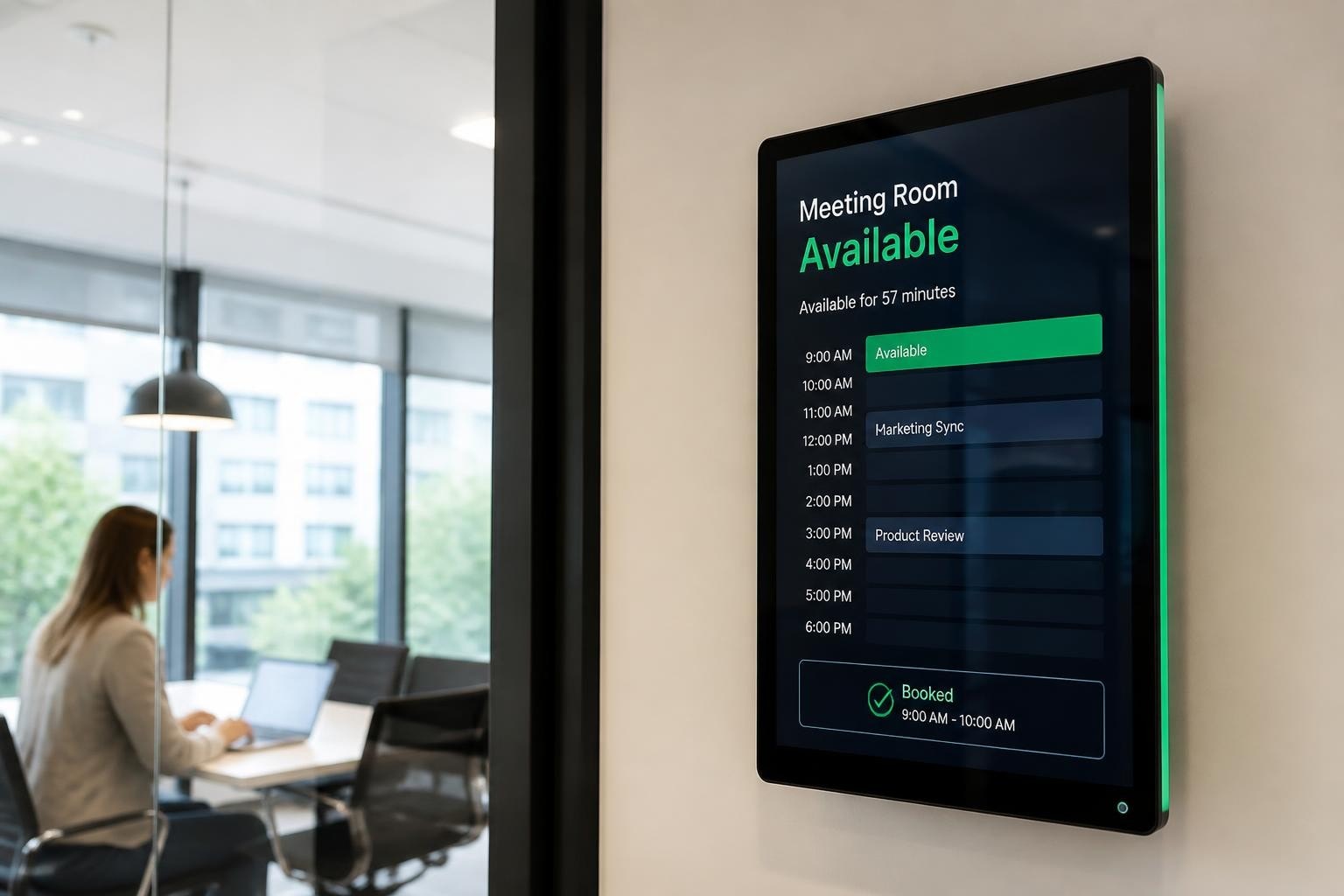
Modern offices face a persistent challenge: coordinating meeting spaces efficiently whilst providing clear, real-time information to employees and visitors. Meeting room digital signage has emerged as the definitive solution, transforming how organisations manage their collaborative spaces. These dynamic displays replace static paper signs, delivering live scheduling data, wayfinding assistance, and brand messaging directly outside or inside conference rooms. As hybrid work patterns reshape office utilisation in 2026, digital signage has evolved from a luxury to a strategic necessity for businesses seeking to maximise space efficiency and enhance the employee experience.
Why Meeting Room Digital Signage Matters in 2026
The hybrid workplace has fundamentally altered how organisations approach meeting room management. Research from Harvard Business Review on hybrid work patterns demonstrates that clear room identification and availability information directly impacts productivity and reduces scheduling conflicts.
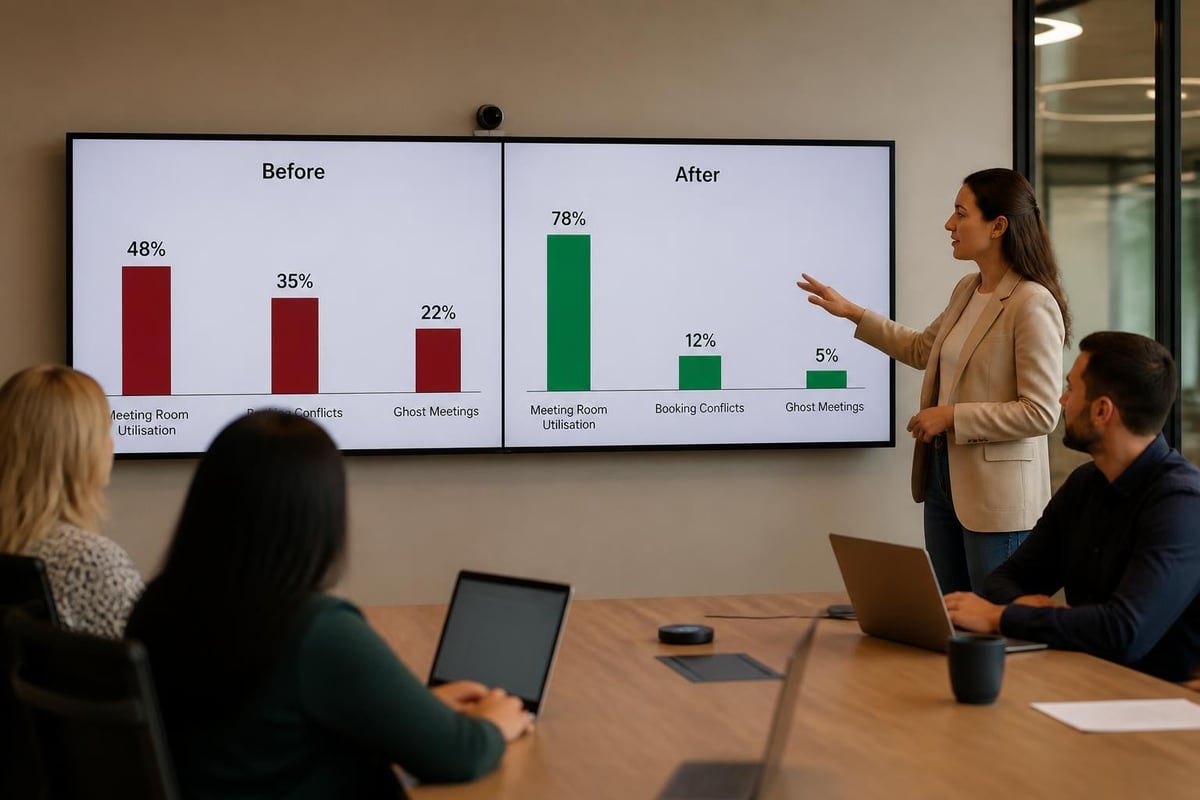
Meeting room digital signage eliminates the confusion of double-bookings and ghost meetings-reserved rooms that remain empty. Digital displays provide instant visibility into room status, upcoming bookings, and availability, allowing teams to make informed decisions about space usage without constant checking of calendar applications.
The Business Case for Digital Room Displays
Organisations implementing meeting room digital signage report measurable improvements across several key metrics:
- Reduced meeting conflicts by 40-60% through real-time availability displays
- Improved space utilisation by identifying underused rooms and peak demand periods
- Enhanced employee experience with intuitive room-finding and booking interfaces
- Lower administrative overhead by automating room management tasks
- Professional visitor impressions through consistent, branded wayfinding
The return on investment extends beyond scheduling efficiency. Digital signage creates opportunities for internal communications, emergency notifications, and branded messaging throughout your office environment.
Core Components of Meeting Room Digital Signage Systems
A complete meeting room digital signage solution comprises several integrated components working together seamlessly. Understanding these elements helps you design a system that meets your specific requirements.
| Component | Function | Key Considerations |
|---|---|---|
| Display Hardware | Visual presentation layer | Screen size (typically 10-24"), viewing distance, mounting options |
| Media Player | Content delivery and management | Processing power, connectivity, software compatibility |
| Content Management System | Centralised control platform | User interface, scheduling features, integration capabilities |
| Calendar Integration | Real-time booking data | Microsoft 365, Google Workspace, Exchange compatibility |
| Sensors (Optional) | Occupancy detection | Privacy compliance, accuracy, battery life |
Display Selection and Placement
The physical display represents your most visible investment. Meeting room digital signage displays typically range from compact 10-inch tablets to larger 24-inch panels, depending on viewing distance and information density.
Consider these factors when selecting displays:
Screen size and resolution: Ensure text remains readable from typical viewing distances (2-3 metres). High-resolution displays (1920×1080 minimum) maintain clarity and professionalism.
Mounting options: Wall-mounted displays adjacent to doorways provide optimal visibility. Some organisations prefer ceiling-mounted displays for larger conference rooms or hallway intersections.
Power and connectivity: Plan for both power supplies and network connections (Ethernet preferred over Wi-Fi for reliability). Power-over-Ethernet (PoE) displays simplify installation by delivering both through a single cable.
Following Microsoft's guidance for Teams meeting rooms ensures your displays integrate smoothly with collaboration platforms whilst maintaining sight lines and accessibility standards.
Calendar Integration and Booking Systems
The true power of meeting room digital signage emerges through seamless calendar integration. Your displays become dynamic information portals, reflecting real-time booking status and enabling on-the-spot reservations.
Synchronisation Methods
Most meeting room digital signage platforms connect to calendar systems through standard protocols:
- Exchange Web Services (EWS): Direct integration with Microsoft Exchange servers
- Microsoft Graph API: Modern connection method for Microsoft 365 environments
- Google Calendar API: Integration with Google Workspace calendar systems
- CalDAV protocol: Open standard supporting various calendar platforms
Real-time synchronisation ensures your displays always reflect current booking status. Updates typically occur within 30-60 seconds of calendar changes, preventing confusion and double-bookings.
Booking Workflows and User Permissions
Well-designed meeting room digital signage supports multiple booking workflows to accommodate different user needs and organisational policies.
Pre-booking through calendar systems: Users reserve rooms through familiar Outlook or Google Calendar interfaces. The digital signage displays the confirmed booking, showing meeting title (or privacy-protected placeholder), organiser, duration, and attendees.
On-the-spot booking: Touch-enabled displays allow users to book available rooms directly from the screen outside the door. This feature proves invaluable for impromptu meetings and flexible workspace utilisation.
Check-in requirements: Progressive organisations implement check-in functionality to combat ghost meetings. If attendees don't confirm presence within 10-15 minutes of the scheduled start time, the system releases the room for others to book.
Content Design and Information Hierarchy
Effective meeting room digital signage balances aesthetic appeal with functional clarity. Your displays serve as wayfinding tools, scheduling interfaces, and brand touchpoints simultaneously.
Essential Information Elements
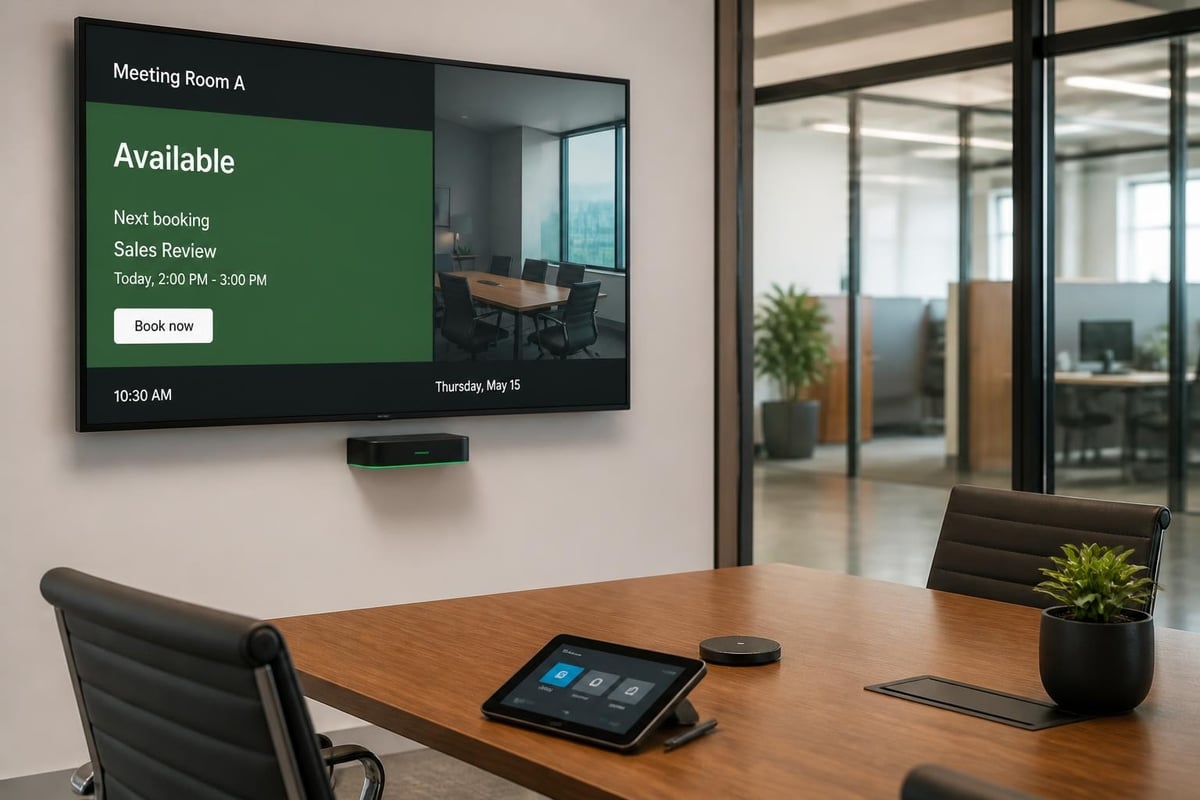
Each meeting room display should present information in a logical, scannable hierarchy:
Primary status indicator: A colour-coded availability signal (green for available, red for occupied, amber for upcoming booking) provides instant understanding from a distance.
Current meeting details: For occupied rooms, display the meeting title (respecting privacy settings), organiser name, and end time. This transparency helps colleagues gauge when the room becomes available.
Upcoming schedule: A timeline view showing the next 2-4 bookings allows users to plan ahead and identify gaps for quick meetings or booking opportunities.
Room identification: Clearly display the room name, capacity, and amenities (video conferencing equipment, whiteboards, presentation displays) to help users select appropriate spaces.
Accessibility and Inclusive Design
Meeting room digital signage must accommodate diverse user needs and comply with accessibility standards. The JMU digital signage accessibility guide provides practical recommendations for inclusive design.
- Colour contrast: Maintain minimum 4.5:1 contrast ratios between text and backgrounds
- Text size: Use minimum 24-point fonts for primary information, larger for viewing distances beyond 2 metres
- Reading time: Allow sufficient display duration for users with different reading speeds
- Alternative information channels: Consider audio announcements or tactile room identifiers for vision-impaired users
Research from the Nielsen Norman Group on usability emphasises that clear visual hierarchy and consistent interaction patterns reduce cognitive load and improve user satisfaction.
Advanced Features and Integration Capabilities
Modern meeting room digital signage extends far beyond basic scheduling displays. Advanced features transform these systems into comprehensive workplace experience platforms.
Occupancy Detection and Analytics
Sensor integration provides valuable insights into actual room utilisation versus scheduled bookings. Passive infrared (PIR) sensors, camera-based systems, or even Wi-Fi/Bluetooth device counting can detect whether scheduled meetings actually occur.
This data enables facilities teams to:
- Identify ghost meetings and implement check-in policies
- Right-size meeting room inventory based on actual demand
- Optimise cleaning schedules around occupancy patterns
- Plan office layouts informed by real usage data
Wayfinding and Directory Integration
Meeting room digital signage naturally extends into broader wayfinding systems. Displays can show interactive floor plans, highlight routes to specific rooms, and provide directory information for visitors seeking particular departments or individuals.
Large organisations benefit from networked displays that update dynamically based on room assignments. If a team relocates, the entire wayfinding system reflects the change automatically without manual sign updates.
Emergency Notifications and Alerts
Your meeting room displays become critical communication channels during emergencies. Content management systems can override normal scheduling displays to broadcast urgent messages, evacuation instructions, or severe weather alerts.
Priority messaging ensures that everyone in the building receives time-sensitive information regardless of their location or device access.
Technical Standards and Security Considerations
Professional meeting room digital signage implementations adhere to industry standards for audio-visual systems and maintain robust security practices.
Industry Standards and Best Practices
The AVIXA standards and guidelines provide authoritative technical specifications for professional AV installations, including digital signage systems. These standards address display placement, cable management, power requirements, and integration protocols.
Understanding digital signage player options helps you select appropriate hardware for your content management platform and network infrastructure.
Cybersecurity for Connected Displays
Meeting room digital signage represents an IoT deployment that requires thoughtful security measures. The NIST IoT cybersecurity guidance offers comprehensive recommendations for securing connected devices.
Network segmentation: Isolate digital signage devices on dedicated VLANs separate from core business systems. This containment strategy limits potential attack vectors.
Authentication and authorisation: Implement strong authentication for content management systems and restrict administrative access to authorised personnel only.
Regular updates: Maintain current firmware and software versions to patch known vulnerabilities. Establish update schedules that balance security needs with display uptime requirements.
Data protection: Calendar integration often involves accessing organisational directory information and meeting details. Ensure appropriate privacy controls and data handling policies are in place.
| Security Measure | Implementation | Benefit |
|---|---|---|
| VLAN isolation | Dedicated network segment | Limits lateral movement |
| Certificate-based auth | PKI infrastructure | Strong device identity |
| Encrypted communications | TLS 1.3 minimum | Protects data in transit |
| Regular patching | Automated update schedule | Reduces vulnerability window |
For organisations implementing web-based signage platforms, W3C Web Signage resources provide standards-oriented guidance on content packaging and interaction considerations.
Content Management and Administration
Efficient meeting room digital signage requires intuitive content management tools that empower administrators without demanding technical expertise.
Centralised Control Platforms
Modern content management systems (CMS) provide web-based interfaces for controlling your entire digital signage network from a single dashboard. Administrators can update content, adjust schedules, monitor display health, and generate reports without physical access to individual screens.
Key CMS capabilities include:
- Template-based design: Pre-built layouts ensure visual consistency whilst allowing customisation for different room types or departments
- Scheduling engine: Define content playlists, transition effects, and display rules based on time, date, or calendar events
- Multi-site management: Control displays across multiple buildings or geographic locations from one central platform
- User permissions: Delegate content creation and approval workflows to department heads whilst maintaining oversight
- Analytics dashboard: Track display performance, content engagement, and room utilisation metrics
Content Creation Workflows
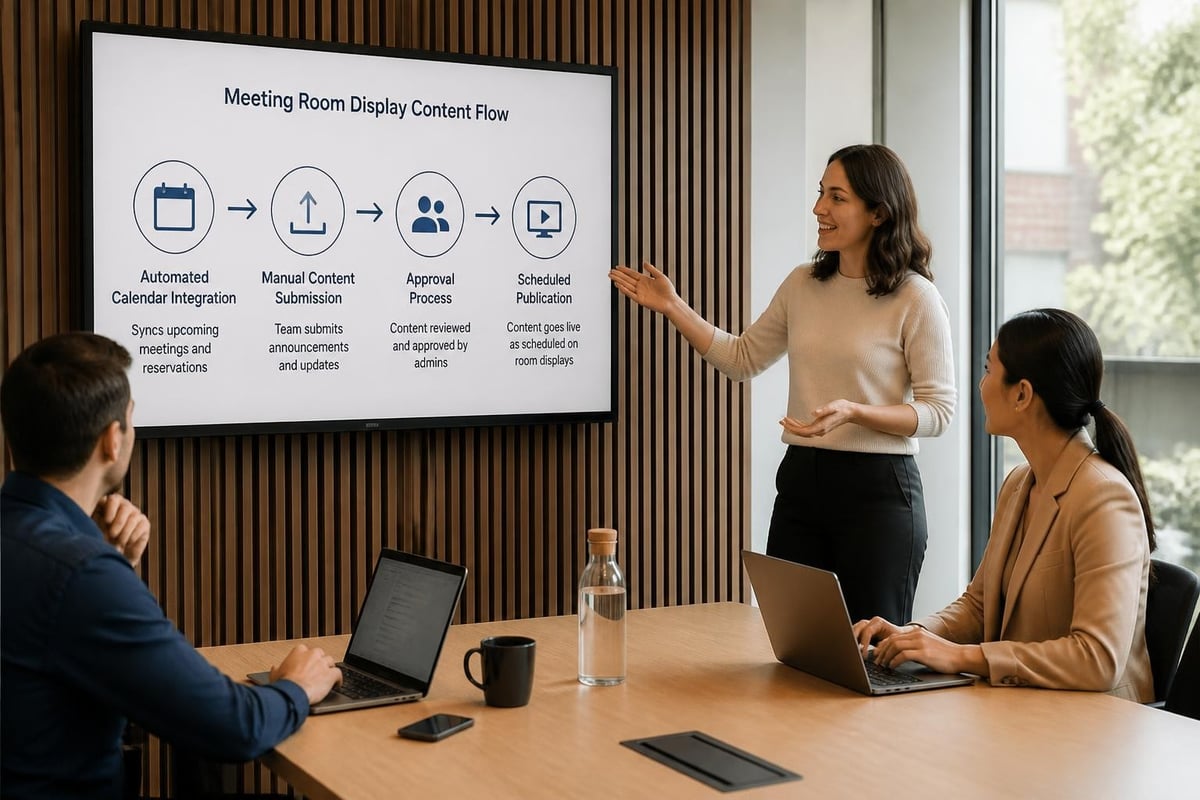
Effective meeting room digital signage balances automated calendar displays with supplementary content such as company announcements, brand messaging, or departmental updates.
Establish clear workflows for content creation and approval:
Automated calendar content: Integrate directly with booking systems to populate room schedules without manual intervention. Configure privacy settings to hide sensitive meeting titles when necessary.
Supplementary messaging: Develop approval processes for non-calendar content to maintain quality and relevance. Designate content owners responsible for different message types (facilities updates, HR announcements, executive communications).
Brand compliance: Create templates that enforce brand guidelines for colours, fonts, and logo usage. This consistency strengthens brand identity whilst simplifying content creation for non-designers.
Choosing the Right Solution for Your Organisation
Meeting room digital signage encompasses a wide range of solutions from standalone displays to enterprise-wide systems. Selecting the appropriate option requires careful consideration of your specific needs and constraints.
Deployment Models
Cloud-based platforms: Software-as-a-Service (SaaS) solutions offer rapid deployment, automatic updates, and predictable subscription pricing. These platforms suit organisations seeking minimal IT overhead and multi-site management capabilities.
On-premises systems: Self-hosted solutions provide maximum control over data, customisation options, and integration with legacy systems. Larger enterprises with established IT infrastructure often prefer this approach.
Hybrid architectures: Combine cloud-based management with local content caching for reliability. Displays continue showing scheduled content even during network interruptions, whilst receiving updates when connectivity resumes.
Scalability and Growth Planning
Consider your organisation's trajectory when selecting a meeting room digital signage platform. Solutions that work well for 10 conference rooms may struggle to manage 100 displays across multiple buildings.
Evaluate vendors on these scalability factors:
- Licensing models: Per-display pricing versus unlimited display options
- Performance thresholds: System responsiveness with growing display counts
- Integration capacity: Ability to connect additional calendar systems, sensors, or third-party platforms
- Support infrastructure: Vendor resources for implementation, training, and ongoing assistance
Professional signage solutions deliver more than just scheduling displays. When you need impactful visual communications throughout your facility, Lightbox Signage from Signshoponline provides illuminated displays that maintain visibility and professional appearance in any environment.

Measuring Success and ROI
Effective meeting room digital signage implementations deliver measurable business value. Establish clear metrics before deployment to demonstrate return on investment and guide ongoing optimisation.
Key Performance Indicators
Space utilisation rates: Compare scheduled meeting time versus actual occupancy (when sensors are deployed). Target 70-80% utilisation during peak hours whilst identifying underused spaces for repurposing.
Booking efficiency metrics: Track the time required to locate and book appropriate meeting spaces. Digital signage should reduce this friction significantly compared to manual processes.
Ghost meeting reduction: Measure the percentage of scheduled meetings where attendees fail to occupy the room. Effective check-in features should reduce ghost meetings by 50% or more.
User satisfaction scores: Survey employees about their meeting room experience before and after digital signage implementation. Focus on ease of finding rooms, understanding availability, and overall workplace satisfaction.
Analytics and Reporting
Robust meeting room digital signage platforms provide comprehensive analytics dashboards revealing utilisation patterns, peak demand periods, and system performance metrics.
Use this data to:
- Justify additional meeting room investment or conversions
- Optimise cleaning and maintenance schedules
- Inform workplace design decisions
- Demonstrate ROI to stakeholders
- Identify opportunities for policy improvements (booking duration limits, advance booking windows)
Implementation Best Practices
Successful meeting room digital signage deployments follow structured implementation processes that minimise disruption whilst ensuring user adoption.
Planning and Assessment
Audit existing spaces: Document all meeting rooms, their capacities, current signage, and amenities. This inventory forms the foundation for your deployment plan.
Identify stakeholders: Engage facilities management, IT, HR, and executive leadership early. Each group brings unique requirements and constraints that shape your solution.
Define requirements: Document must-have features versus nice-to-have capabilities. Prioritise calendar integration, display locations, and budget constraints before evaluating vendors.
Pilot deployment: Test your selected solution in 2-3 representative meeting rooms before organisation-wide rollout. This pilot phase reveals integration challenges, user experience issues, and training needs.
Training and Change Management
Even intuitive meeting room digital signage requires user education to drive adoption and realise full value.
Develop a multi-channel training approach:
- Live demonstrations: Host lunch-and-learn sessions showcasing booking workflows and features
- Quick-start guides: Create one-page reference cards posted near displays
- Video tutorials: Develop short clips addressing common tasks (booking rooms, checking in, extending meetings)
- Champions network: Identify power users in each department who can provide peer support
Accessibility considerations extend beyond the displays themselves. Ensure that training materials and support resources accommodate diverse learning styles and accessibility needs, following ADA digital accessibility guidance.
Maintenance and Support
Establish clear support processes before deployment to address technical issues promptly and maintain user confidence.
Proactive monitoring: Implement system health checks that alert administrators to offline displays, synchronisation failures, or content errors before users report problems.
Help desk integration: Train support staff on common meeting room digital signage issues and escalation procedures. Document troubleshooting steps for frequent problems.
Hardware lifecycle planning: Budget for display replacements and upgrades on a 5-7 year cycle. Technology advances and normal wear necessitate periodic hardware refreshes.
Future Trends in Meeting Room Digital Signage
Meeting room digital signage continues evolving rapidly, incorporating emerging technologies and responding to changing workplace dynamics.
Artificial Intelligence Integration
AI-powered systems optimise room assignments based on meeting purpose, attendee count, and equipment requirements. Intelligent scheduling engines suggest appropriate spaces and timing to minimise conflicts whilst maximising utilisation.
Natural language processing enables voice-activated booking and queries. Users can ask displays, "When is this room next available?" or "Book this room for 30 minutes" without touching screens or opening calendar applications.
Enhanced Collaboration Features
Meeting room digital signage increasingly integrates with collaboration platforms beyond simple calendar sync. Displays show active Microsoft Teams or Zoom meetings, provide one-touch join capabilities, and indicate remote participant counts for hybrid meetings.
Interactive displays outside rooms allow visitors to notify meeting participants of their arrival, reducing interruptions whilst improving coordination.
Sustainability and Energy Efficiency
Modern meeting room digital signage incorporates power-saving features that reduce environmental impact whilst lowering operating costs. Displays automatically dim or enter standby mode during building closure hours, presence-detection sensors prevent unnecessary operation, and energy consumption reporting helps organisations track and optimise usage.
Meeting room digital signage transforms workplace coordination from a persistent challenge into a strategic advantage, delivering measurable improvements in space utilisation, employee satisfaction, and operational efficiency. Whether you're upgrading existing conference rooms or planning entirely new facilities, Signshoponline brings extensive expertise in digital signage solutions tailored to your specific requirements. Our comprehensive range of custom signage, displays, and integrated systems ensures your organisation maximises its investment whilst creating exceptional workplace experiences.


